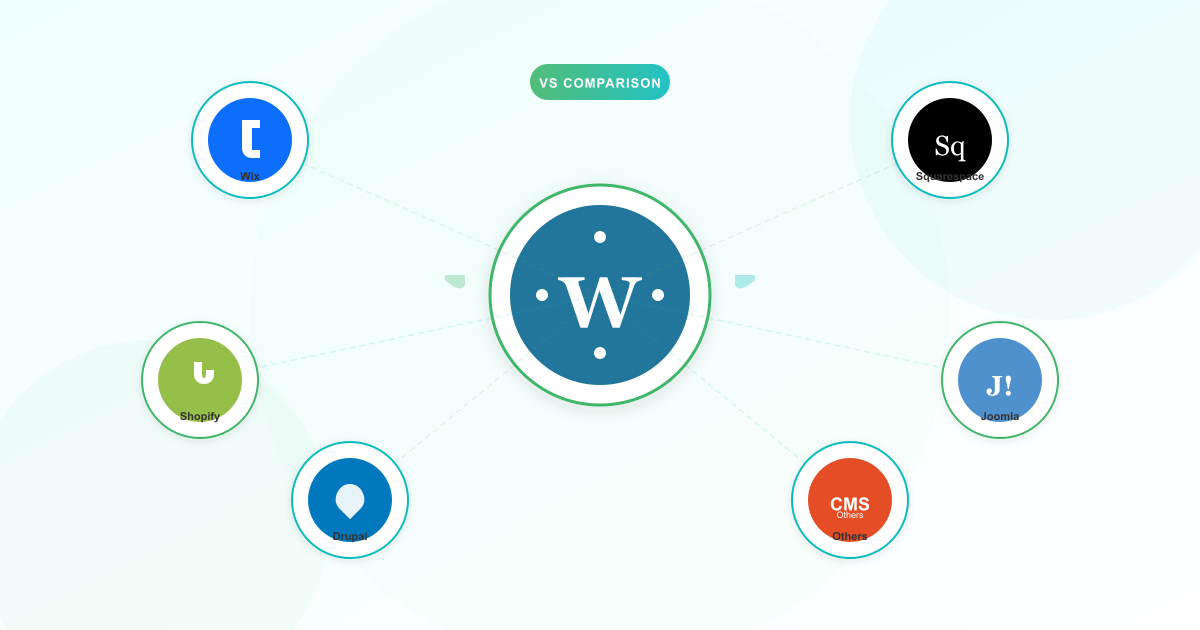



WordPress powers 43% of all websites. But that doesn’t automatically make it the right choice for yours.
The best CMS (content management system) depends on your goals, budget, technical skills, and — if you’re running a business in Africa — whether the platform supports the payment methods your customers actually use. Every WordPress vs other CMS comparison you’ll find online skips that last point. This one doesn’t.
This guide gives you an honest look at six popular CMS platforms. No sales pitch. Just a clear comparison so you can choose with confidence.
Quick Decision Matrix: Choose Your CMS in 60 Seconds
Before you dive into the details, here’s the shortcut.
Choose WordPress if you want full control over your site, plan to sell online with mobile money or Paystack, or expect your business to grow significantly.
Choose Wix if you need a simple website fast and don’t want to manage hosting, updates, or security yourself.
Choose Squarespace if you’re a creative professional or service business and design matters more than deep customisation.
Choose Shopify if selling products is your primary business activity and you need built-in inventory management.
Choose Joomla or Drupal if you have a dedicated developer and need complex content structures for a large organisation.
What Is a CMS?
A content management system (CMS) is the software that lets you build and manage a website without writing code from scratch.
Think of it as the engine behind your website. The CMS handles the structure, the pages, the blog posts, and the design templates. You focus on your content and your business.
Some CMS platforms are self-hosted — you install them on your own hosting account and have full control. Others are hosted platforms — the company runs everything for you, but you trade control for convenience.
That distinction matters more than most comparisons admit. Let’s break down each option.
WordPress — The Flexible Open-Source Powerhouse
In any WordPress vs other CMS discussion, WordPress starts with a structural advantage: a 60.2% share of the CMS market. It’s open-source, free to download, and runs on virtually any hosting account.
Where WordPress shines:
- Flexibility. With over 60,000 free plugins and 14,000 free themes, you can build almost anything — a blog, a business site, an online store, a membership portal, or a learning platform.
- Full ownership. Your content, your data, your domain. You’re never locked into a single provider. If you want to switch hosts, you take everything with you.
- Ecommerce with local payments. WooCommerce (the most popular WordPress ecommerce plugin) integrates with Paystack, which supports MTN Mobile Money, Vodafone Cash, AirtelTigo, card payments, and bank transfers in Ghana. That’s a game-changer for African businesses selling online.
- Cost efficiency. Self-hosted WordPress costs $50–$300 per year for a basic site, including hosting, domain, and free themes. Compare that to $192–$468 per year for hosted platforms.
- Community. Millions of developers, thousands of tutorials, and an answer for almost any problem you’ll encounter.
If you’re curious about how WordPress plugins extend your site, read our guide to essential WordPress plugins for business.
Where WordPress falls short:
- You manage security. WordPress sites account for 95.5% of all hacked CMS websites. Before you panic — that stat reflects WordPress’s massive market share, not a flaw in the platform itself. The real culprit is outdated plugins and themes on poorly maintained sites. With proper hosting that includes security tools like Imunify360 and regular updates, WordPress is rock-solid. Learn more about protecting your website.
- Performance depends on your hosting. Only 44–45% of WordPress sites pass all three Core Web Vitals on mobile, compared to around 65% for Shopify and 60% for Wix. But this is a hosting and plugin management issue, not a WordPress issue. Quality hosting with optimised WordPress servers closes that gap.
- Learning curve. WordPress is more powerful than drag-and-drop builders, which means it takes a bit more time to learn. The dashboard, plugin management, and theme customisation can feel overwhelming at first.
Best for: Businesses that want full control, plan to sell online (especially with mobile money), or expect to scale over time.
Wix — The Drag-and-Drop Beginner’s Choice
Wix grew from 0.1% to 4.2% CMS market share by making website building genuinely easy. In the WordPress vs Wix debate, ease of use is Wix’s strongest card.
Where Wix shines:
- Easiest learning curve. Drag-and-drop editing with no code required. If you can use a smartphone, you can build a Wix site.
- All-in-one package. Hosting, security, and SSL are included. No separate hosting account to manage.
- Templates and AI tools. Hundreds of professionally designed templates, plus AI-powered tools for generating layouts and content.
- Fast setup. You can have a basic business website live within a few hours.
Where Wix falls short:
- Monthly cost adds up. Plans start at $17/month. Over two years, you’ll spend at least $408 — significantly more than self-hosted WordPress.
- Limited customisation at scale. The drag-and-drop editor is great for simple sites, but becomes frustrating when you need complex functionality or unique designs.
- Vendor lock-in. You can’t export a Wix site and move it to another platform. Your content lives on Wix’s servers, and if you outgrow the platform, you’re starting over.
- Limited African payment gateways. Wix’s ecommerce doesn’t natively support Paystack or most mobile money providers. If your customers pay with MTN MoMo, Wix makes that difficult.
Best for: Simple business websites, portfolios, or first-time site owners who want something live quickly without technical complexity.
Squarespace — The Design-First Platform
Squarespace holds 2.5% of the CMS market and has built a reputation for visually striking templates. In a WordPress vs Squarespace comparison, design is where Squarespace pulls ahead.
Where Squarespace shines:
- Beautiful design. Squarespace templates are consistently polished. If visual presentation is your priority, Squarespace delivers out of the box.
- Built-in features. Email marketing, basic analytics, appointment scheduling, and ecommerce are all integrated without needing third-party tools.
- Clean interface. The editing experience is intuitive and well-designed. Less cluttered than WordPress, more structured than Wix.
Where Squarespace falls short:
- Fewer integrations. Squarespace has a fraction of the plugins and extensions available on WordPress. If you need something the platform doesn’t offer natively, your options are limited.
- Less flexible than WordPress. Customising beyond what the templates allow requires custom CSS/code injection. For non-technical users, you hit a wall.
- Limited African payment support. Like Wix, Squarespace doesn’t natively integrate with Paystack or mobile money providers common in Ghana, Nigeria, and Kenya.
- Price. Plans start at $16/month ($192/year) for a basic site — and the ecommerce plans cost more.
Best for: Creative businesses, photographers, restaurants, and service-based businesses where design makes a strong first impression.
Shopify — The Ecommerce Specialist
Shopify commands 5.1% of the CMS market and is purpose-built for selling products online. The WordPress vs Shopify question comes down to whether ecommerce is your primary activity or one part of a broader site.
Where Shopify shines:
- Built for selling. Inventory management, order tracking, shipping integrations, and payment processing are all native. Shopify does ecommerce better than any general-purpose CMS.
- Reliable checkout. Shopify’s checkout process is optimised and battle-tested by millions of stores.
- App ecosystem. Thousands of apps for marketing, shipping, customer service, and more.
- Paystack integration available. Unlike Wix and Squarespace, Shopify does support Paystack as a payment gateway, making it a viable option for African ecommerce.
Where Shopify falls short:
- Expensive. Plans start at $39/month ($29/month billed annually). That’s $348–$468/year before you add any paid apps.
- Transaction fees. Unless you use Shopify Payments (not available in most African countries), Shopify charges an additional 0.6–2.0% per transaction on top of your payment gateway fees. WooCommerce doesn’t charge transaction fees — only the standard 2–3% from your payment processor.
- Limited for non-ecommerce content. Shopify’s blogging and content management features are limited compared to WordPress. If you need both a strong blog and an online store, WordPress with WooCommerce gives you more.
- Vendor lock-in. Like Wix and Squarespace, moving away from Shopify means rebuilding from scratch.
Best for: Businesses focused primarily on selling products online, especially if you need robust inventory management.
For a deeper look at setting up an online store in Ghana, read our ecommerce hosting guide.
Joomla and Drupal — The Fading Open-Source Veterans
Joomla and Drupal are both open-source and self-hosted, like WordPress. But their combined CMS market share has fallen from roughly 17% to under 5% over the past decade. Joomla dropped from 10.9% to 1.8%. Drupal fell from 6.1% to 0.7%.
We’re covering them together because the story is similar for both.
Where they shine:
- Power for complex sites. Drupal in particular excels at handling complex content types, user permissions, and multi-site architectures. Government agencies and large universities still choose Drupal for good reason.
- Open-source flexibility. Like WordPress, you own your code, your data, and your hosting. No vendor lock-in.
Where they fall short:
- Steep learning curve. Both platforms require significant technical knowledge to set up and manage. Joomla’s admin panel is cluttered. Drupal practically requires a developer.
- Shrinking communities. Fewer developers, fewer themes, fewer plugins, and fewer tutorials than WordPress. Finding affordable help for Joomla or Drupal in Ghana or Nigeria is harder than finding WordPress expertise.
- Not worth the complexity for most SMEs. Unless you have specific enterprise requirements, WordPress gives you the same open-source benefits with a vastly larger ecosystem.
Best for: Large organisations with dedicated development teams and complex content requirements. Not recommended for small or medium businesses.
The African Business Perspective: WordPress vs Other CMS Costs and Realities
Most CMS comparisons are written for businesses in North America and Europe. Here’s what they leave out.
Total Cost of Ownership
Hosted platforms (Wix, Squarespace, Shopify) charge in USD. When you factor in the exchange rate, a “$17/month” Wix plan costs significantly more in GHS — and that cost compounds every month.
Self-hosted WordPress on local hosting lets you pay in GHS with predictable pricing. Your hosting, domain, and free themes/plugins can cost far less annually. For a detailed breakdown of the real costs, see our guide on free vs paid hosting.
Mobile Money Payment Support
This is the single biggest differentiator for African ecommerce — and where the WordPress vs other CMS comparison becomes decisive.
MTN MoMo is the dominant mobile money platform in Ghana. If your customers use it — and many do — your CMS needs to support it.
WordPress + WooCommerce + Paystack gives you MTN Mobile Money, Vodafone Cash, AirtelTigo, card payments, and bank transfers. All integrated. All working.
Shopify supports Paystack as well, making it a viable ecommerce option. But Wix and Squarespace don’t natively integrate with these payment methods. For businesses selling to Ghanaian, Nigerian, or Kenyan customers, that’s a dealbreaker.
Bandwidth and Page Weight
Many of your visitors access your site on mobile data, which costs real money. A bloated site wastes your customer’s data — and their patience.
Self-hosted WordPress on quality hosting gives you control over page weight through caching plugins, image optimisation, and lightweight themes. Hosted platforms give you less control over what loads on your pages.
Try Before You Commit
Here’s something most WordPress vs other CMS comparisons won’t mention: if you use hosting with Softaculous (a one-click app installer), you can install WordPress, Joomla, Drupal, and 400+ other apps to test them yourself. No commitment. No extra cost.
Every LUMINWEB hosting plan includes Softaculous. Install WordPress today, try Joomla tomorrow, and decide based on your own experience. Explore your options with affordable shared hosting.
Side-by-Side CMS Comparison Table
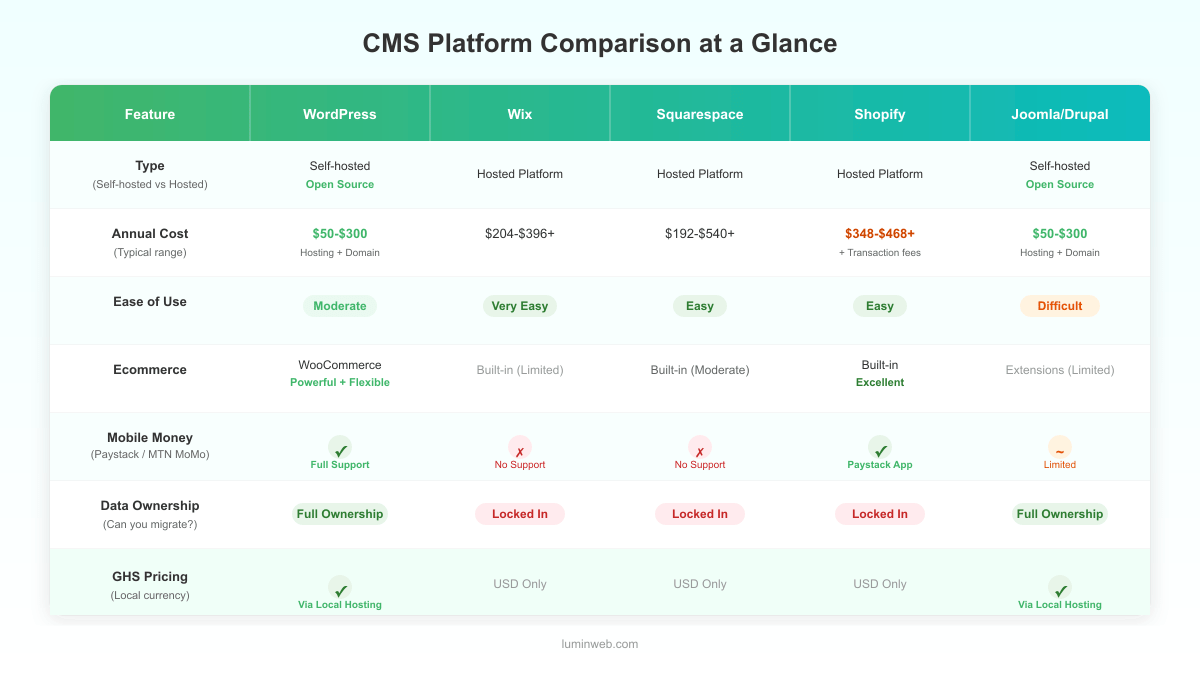
| Feature | WordPress | Wix | Squarespace | Shopify | Joomla/Drupal |
|---|---|---|---|---|---|
| Type | Self-hosted (open-source) | Hosted platform | Hosted platform | Hosted platform | Self-hosted (open-source) |
| Annual cost | $50–$300 (hosting + domain) | $204–$396+ | $192–$540+ | $348–$468+ | $50–$300 (hosting + domain) |
| Ease of use | Moderate learning curve | Very easy | Easy | Easy (for stores) | Difficult |
| Ecommerce | WooCommerce (powerful, flexible) | Built-in (limited) | Built-in (moderate) | Built-in (excellent) | Extensions available (limited) |
| Mobile money (Paystack) | Yes (WooCommerce + Paystack) | No native support | No native support | Yes (Paystack app) | Limited |
| Customisation | Unlimited (60,000+ plugins) | Limited | Limited | Moderate (apps) | High (requires developer) |
| Data ownership | Full — you own everything | Platform-locked | Platform-locked | Platform-locked | Full — you own everything |
| GHS pricing available | Yes (via local hosting) | No (USD only) | No (USD only) | No (USD only) | Yes (via local hosting) |
| Community size | Massive | Large | Medium | Large | Shrinking |
How to Decide: A Practical CMS Selection Framework
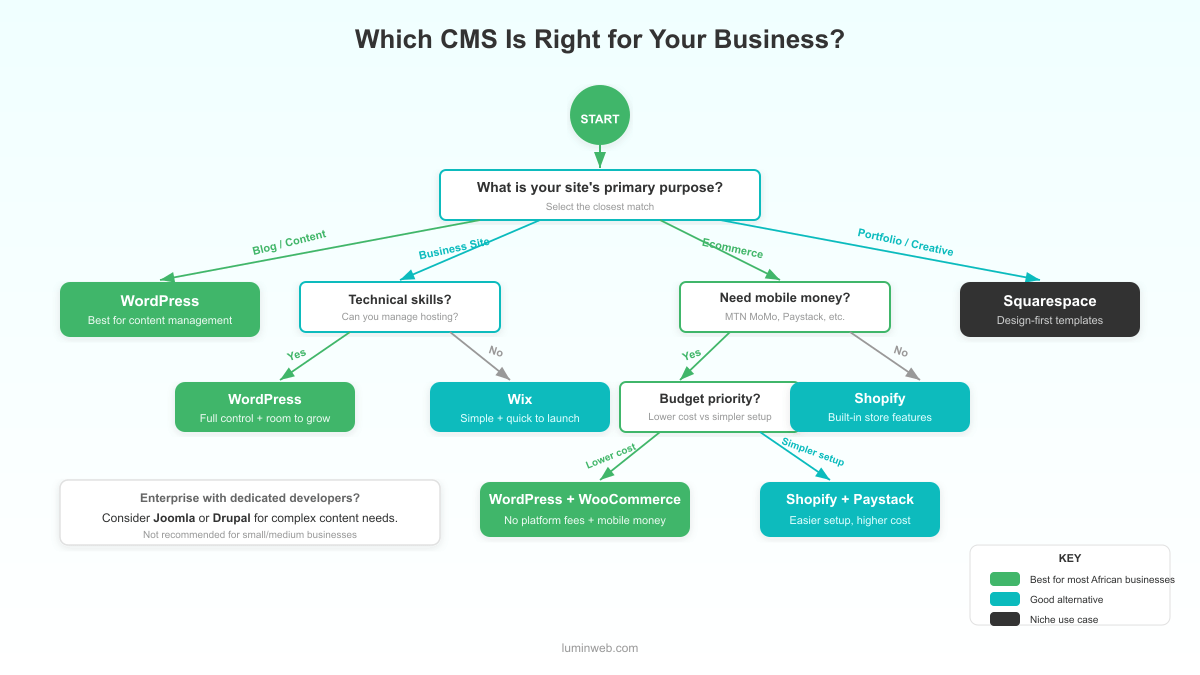
Forget the feature lists for a moment. Start with three questions.
1. What is the primary purpose of your website?
- Brochure/business site: WordPress or Wix. WordPress if you want control and room to grow. Wix if you need something simple and fast.
- Ecommerce store: WordPress + WooCommerce (especially if you need mobile money) or Shopify (if Paystack meets your needs and you don’t mind the higher cost).
- Portfolio or creative showcase: Squarespace, or WordPress with a premium theme.
- Blog or content-heavy site: WordPress. Nothing else comes close for content management.
2. What are your technical skills?
- Non-technical: Wix or Squarespace for the simplest experience. WordPress if you’re willing to spend a few hours learning.
- Somewhat technical: WordPress. The learning curve pays off quickly.
- Developer available: WordPress, Drupal (enterprise only), or Joomla (if there’s a specific reason).
3. Do you need mobile money payments?
If yes, your realistic options are WordPress + WooCommerce or Shopify. Both support Paystack. WordPress gives you lower ongoing costs and no platform transaction fees.
Getting Started with WordPress
If WordPress is your choice, the right hosting makes all the difference.
LUMINWEB WordPress Hosting gives you one-click WordPress installation, servers optimised for WordPress performance, Imunify360 security with firewall and malware scanning, and automatic backups.
You can install WordPress in minutes and start building your site the same day.
Want to understand what happens behind the scenes? Read our complete guide on how WordPress hosting works.
Frequently Asked Questions
What is the best CMS for a small business?
It depends on your needs. For most small businesses — especially those in Africa that want ecommerce with mobile money — WordPress offers the best balance of flexibility, cost, and payment support. Wix is a good alternative if you need a simple site with no ecommerce.
Is WordPress still the best CMS in 2026?
WordPress still powers 43% of all websites and holds over 60% of the CMS market. Its market share has dipped slightly from a peak of 65.2% in 2022 as platforms like Wix and Shopify have grown. But for flexibility, ownership, and ecosystem size, WordPress remains the strongest all-round option.
Is Wix better than WordPress for beginners?
Wix is easier to learn. Its drag-and-drop editor requires zero technical knowledge. But “easier” doesn’t always mean “better.” WordPress offers more long-term value, lower costs, and far greater flexibility. If you’re willing to invest a few hours learning the basics, WordPress rewards you with a more powerful site.
Which CMS supports mobile money payments in Africa?
WordPress (via WooCommerce + Paystack) and Shopify (via Paystack integration) both support MTN Mobile Money, Vodafone Cash, and other local payment methods in Ghana. Wix and Squarespace do not natively support these payment gateways.
Should I use WordPress or Shopify for ecommerce in Ghana?
Both support Paystack for local payments. WordPress + WooCommerce is more affordable — no platform transaction fees, lower annual costs, and full ownership of your store. Shopify is simpler to set up for ecommerce but costs more and charges additional transaction fees (0.6–2.0%) unless you use Shopify Payments, which isn’t available in Ghana.
What is the cheapest CMS for a small business?
Self-hosted WordPress is the most affordable option at $50–$300 per year (hosting + domain + free themes and plugins). Wix starts at $17/month ($204/year), Squarespace at $16/month ($192/year), and Shopify at $29/month billed annually ($348/year). WordPress’s cost advantage grows over time.
