


If you run a business website in Ghana and it is not showing up on Google, your hosting is an obvious suspect.
Does web hosting affect SEO?
Yes, but indirectly, and less than you may have been told. Hosting touches three things Google documents: your server’s response speed, whether Google’s crawler reaches your pages without errors, and whether pages load over HTTPS.
None of those outweighs the content itself. Google’s page experience guide says Google Search “always seeks to show the most relevant content, even if the page experience is sub-par.” So before you blame your host or pay to move, check whether hosting is the problem at all. Every check is free, and most use Google’s own tools.
How does hosting affect page speed and Core Web Vitals?
Your host controls how quickly your server starts sending a page, which is the first part of how fast that page loads. Google uses a set of speed and stability measurements called Core Web Vitals in ranking, but it is clear that good scores do not promise a high position.
The same page experience guide says Google’s core ranking systems “look to reward content that provides a good page experience”, and that there is no single page experience signal. The part Google names as used in ranking is Core Web Vitals: “Core Web Vitals are used by our ranking systems.” It then adds that good Core Web Vitals results do not guarantee your pages will rank at the top of Google Search, and that for many queries a great page experience can contribute to success where lots of helpful content is available.
Core Web Vitals are three measurements of what a visitor experiences. Google’s targets for a good experience are:
- Largest Contentful Paint (LCP), how long the main content takes to appear: within 2.5 seconds
- Interaction to Next Paint (INP), how quickly the page reacts when someone taps or clicks: less than 200 milliseconds
- Cumulative Layout Shift (CLS), how much the layout jumps while it loads: less than 0.1
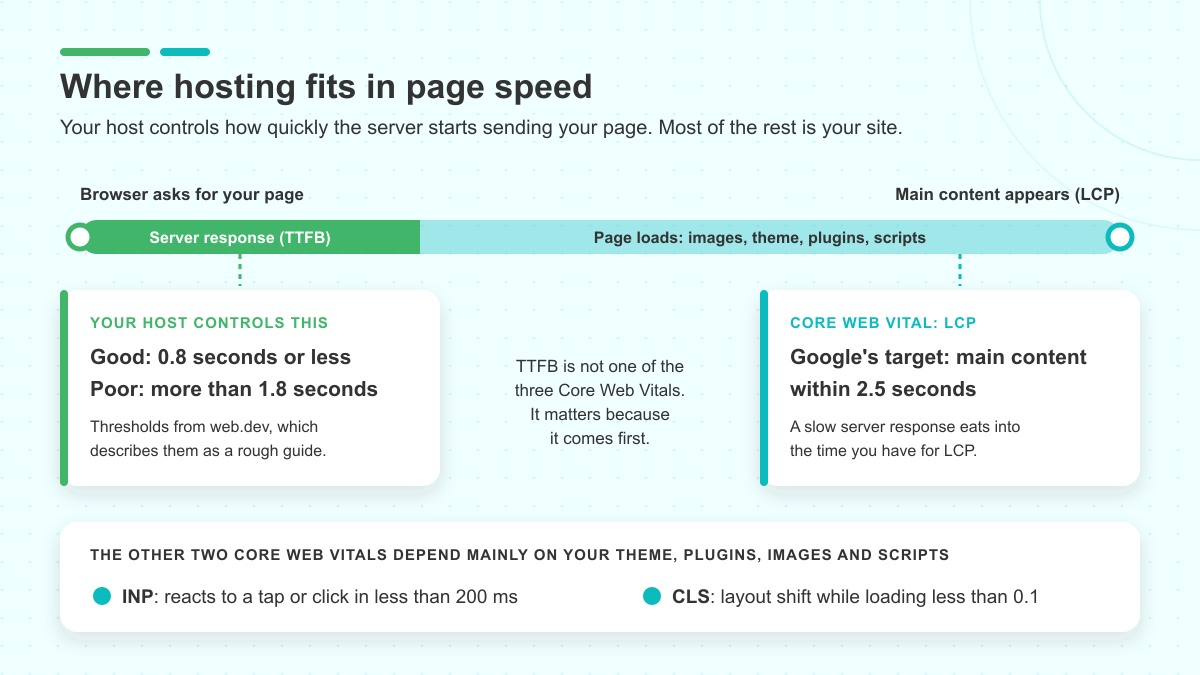
Hosting mostly affects the first of these. Before a browser can show anything, your server has to receive the request and start sending the page back. INP and CLS depend mainly on your theme, plugins, images and scripts, so moving to a new host will not fix a page that jumps around or freezes when someone taps a button.
What is a good server response time (TTFB)?
The server’s part of the wait is measured as Time to First Byte (TTFB): the time between a browser asking for your page and the first piece of it arriving. web.dev, Google’s Chrome team guidance site, calls TTFB a metric for “connection setup time and web server responsiveness”. It treats 0.8 seconds or less as a good TTFB and more than 1.8 seconds as poor, and describes those thresholds as a rough guide.
TTFB is not one of the three Core Web Vitals. It matters because it comes first. Every fraction of a second your server spends before responding is time spent before the main content can appear, so a slow server response eats into the 2.5 seconds you have for LCP.
If many of your customers open your site on a phone over mobile data, judge your speed by the mobile results, not by how the site feels on your office connection. For a fuller walkthrough of the site-side fixes, see our guide to speeding up WordPress and Core Web Vitals.
Does website downtime affect Google rankings?
Google describes the effect of downtime in terms of crawling and indexing. Server errors slow Google’s crawler down for a while, and Google removes pages from its index over server errors when those errors persist.
When a server fails to serve a page, Google’s crawler receives a server error, a status code in the 5xx range, instead of your page. Google’s guide to how HTTP status codes affect its crawlers says these errors make its crawlers temporarily slow down crawling, and that already indexed URLs are preserved in the index but eventually dropped.
The word that carries the risk is “persistently”. Google says its indexing pipeline removes from the index URLs that persistently return a server error, and that once your server responds normally again, Google gradually increases crawling. A few minutes of downtime is not the same as losing your pages. The risk lies in a site that keeps failing over a long stretch.
Downtime also costs you in a way no Google report measures: a customer who finds your site down cannot contact you or buy from you that day.
If you have to take your site offline
Sometimes the downtime is planned, for a redesign, a repair or a move to another host. For an urgent shutdown of one or two days, Google recommends returning an informational error page with a 503 status code instead of your normal content. It describes disabling a whole site as an extreme measure that is meant for a few days at most.
If your host is carrying out maintenance, ask in advance what your site will return while the work runs and how long it will take. If you are changing provider, our guide to moving your site to a new host takes you through the move.
Does a slow server mean Google crawls you less?
It can, but for most small business sites it makes little practical difference. Google’s crawl budget guide says that if a site responds consistently and its response times, including TTFB, stay stable or improve, the limit on how much Google crawls goes up. If the site slows down or returns 5xx errors, the limit goes down and Google crawls less.
That guide is written for large sites: roughly 1 million or more unique pages, or 10,000 or more pages whose content changes daily, and Google calls those numbers rough estimates. It also says that if your pages seem to be crawled the same day they are published, you do not need the guide. A company site with a few dozen pages is not in that position, so speed and server errors deserve your attention far more than crawl budget does.
Does HTTPS help SEO?
HTTPS, the secure version of a web address shown by the padlock in your browser, is part of what Google calls page experience. In 2014 Google called it a very lightweight ranking signal, and its current guidance says page experience aspects other than Core Web Vitals do not directly lift rankings.
The two statements are worth reading side by side. In August 2014, Google announced that it was starting to use HTTPS as a ranking signal. It described it then as a very lightweight signal, affecting fewer than 1% of global queries and carrying less weight than other signals such as high-quality content.
Google’s current page experience guide lists “Are your pages served in a secure fashion?” among the questions to ask about page experience. It also says: “Beyond Core Web Vitals, other page experience aspects don’t directly help your website rank higher in search results.” Taken together, they give you no reason to expect a ranking jump from switching on HTTPS.
The practical reason to have HTTPS is your visitors. Open your own site and look at the address bar. If it shows a warning instead of a padlock, your visitors see the same warning, sometimes just before they enter a phone number or make a payment. Our guide to managed and self-managed SSL certificates explains how certificates are set up and renewed.
On LUMINWEB shared hosting, SSL certificates are issued and renewed automatically, on both cPanel and DirectAdmin. Your padlock does not depend on you remembering a renewal date.
Does server location affect SEO?
For a country-code domain, where your server sits does not tell Google which country you serve. In its guide to multi-regional and multilingual sites, Google lists a country-code domain, one tied to a single country, as giving “clear geotargeting” with “server location irrelevant”.
What your server does affect is speed, and speed is something you can measure directly rather than guess from a map. If you want to know whether your server responds quickly enough for your visitors, look up its TTFB in PageSpeed Insights, which is free. TTFB appears in the real-user (field) data, marked as experimental, and only when there is enough real-user data. If PageSpeed Insights says there isn’t enough real-user data for your page, it shows figures for your whole site instead. A new or low-traffic site may get no real-user figures at all. The lab results still help you debug, but they cannot replace real-user TTFB.
Hosting and SEO claims, checked against Google’s documentation
You may come across claims like the ones below. Each goes further than Google’s own pages.
| What you may read | What Google’s documentation says |
|---|---|
| “Uptime is a ranking factor.” | Google describes server errors slowing its crawling and, when they persist, removing pages from the index. That is a crawling and indexing effect, and removal is tied to errors that persist. |
| “Host in your country to rank in your country.” | For a country-code domain, Google lists server location as irrelevant to geotargeting. |
| “An SSL certificate gives you a big ranking boost.” | Google’s 2014 announcement called HTTPS a very lightweight signal, and its current page says aspects beyond Core Web Vitals do not directly lift rankings. |
| “A faster host gets you onto page one.” | Good Core Web Vitals do not guarantee top rankings, and Google says Search seeks to show the most relevant content even when page experience is sub-par. |
How to check whether your hosting is hurting your SEO
You can run every check here yourself. Two of them need Google Search Console, Google’s free tool for site owners. If you have not set it up yet, you add your site and prove you own it. Google says data should start to appear within a few days.
| Hosting factor | How to check it for free | What to ask your host |
|---|---|---|
| Server response speed | Run your homepage and one important page through PageSpeed Insights. In the real-user data on the mobile result, note TTFB and LCP, and compare them with the targets above. In Search Console, open the Core Web Vitals report for a site-wide view of LCP, INP and CLS from real visits. A small or new site may see “No data available” there. | What server response time can a site like mine expect on your plans? |
| Server errors and downtime | In Search Console, check the Page indexing report for pages not indexed because of a server error (5xx). The Crawl stats report, under Settings, is optional: it shows Google’s server responses, average response time and any availability issues, and Google says sites with fewer than a thousand pages should not need it. | How do you handle outages, and what does my site return during planned maintenance? |
| HTTPS | Type your address with http:// in front. If it moves to https:// and shows a padlock, HTTPS is working. Repeat on a few inner pages. | Are certificates issued and renewed automatically, or do I manage renewals? |
| Server location | On a country-code domain, there is nothing to check for geotargeting. Either way, measure speed instead, using the first row. | Not needed for geotargeting on a country-code domain. |
Once you have the results, read them in this order:
- TTFB is poor and stays poor, even on a light page. That points at the server or the plan, and it is a fair question for your host.
- TTFB is good but LCP is slow. The delay is most likely in the page itself: large images, a heavy theme or too many plugins. A new host will change little.
- INP or CLS is poor. Look at your theme, plugins and scripts first.
- Server errors keep appearing in Search Console. Raise them with your host and ask what caused them.
- Nothing above shows a problem. Hosting is probably not what is holding you back. Your next step is the content and the other ways customers find you, covered in our guide to getting your business found online in Ghana.

These checks take a few minutes, so add them to your website maintenance checklist and repeat them after any big change to your site.
Choosing web hosting in Ghana with SEO in mind
If the checks do point at your host, judge the next one on the same factors Google documents:
- A server response you can measure. Ask for the response times a site like yours can expect, and test a live site on that host if you can.
- Reliable availability and a clear answer on maintenance, including what your site returns while work is under way.
- SSL included and renewed automatically, so HTTPS never lapses.
- Room to grow. If your traffic has outgrown a shared plan, compare shared and dedicated hosting or read how cloud hosting works before you decide.
Our guide to how to choose reliable hosting in Ghana covers the rest of the decision.
LUMINWEB WordPress Hosting runs on WordPress-optimized servers for fast load times. It includes free SSL on every site and Imunify360 security with a firewall and malware scanning. LUMINWEB hosting plans use SSD storage, with NVMe storage on VPS plans, and LUMINWEB works to a 99.9% uptime target. That figure is a target, not a guarantee.
None of this replaces the checks above. If your server responds quickly and Google meets no errors on your site, a different host will not change much. If your results do point at your server, look at LUMINWEB WordPress Hosting, or contact the LUMINWEB team with your PageSpeed Insights results and ask what would change for your site.
