



You just installed WordPress and you’re staring at a plugin directory with tens of thousands of options. Which essential WordPress plugins does your business website actually need?
Here’s the truth: most business websites need 10 to 15 well-chosen plugins. Not 30. Not 50. Every plugin you install adds code your server has to run on each page load. Too many WordPress plugins slow your site down — and that’s a real problem when your visitors are browsing on mobile data.
This guide walks you through the 10 essential WordPress plugin categories that actually matter for a business website. You’ll get one or two tested recommendations per category, plus a secret weapon: knowing what your hosting already handles so you can skip plugins you don’t need.
What Your Hosting Already Covers (Skip These WordPress Plugins)
Before you install a single plugin, check what your hosting plan includes. Many popular plugin guides recommend security, SSL, and backup plugins without considering that quality hosting already covers these.
If you’re on LUMINWEB WordPress Hosting, your plan already includes:
- Imunify360 security suite — server-level firewall, malware scanning, and intrusion detection. This protects at a deeper level than WordPress security plugins can reach. WordPress security plugins only operate within PHP. They can’t protect your server software, cron jobs, or control panel. Imunify360 covers all of that.
- Free SSL certificates — no need for a separate SSL plugin. Your site gets HTTPS encryption out of the box.
- Automatic backups — regular backups with restore functionality built into your hosting panel.
- Softaculous installer — one-click installation for WordPress and over 400 other applications.
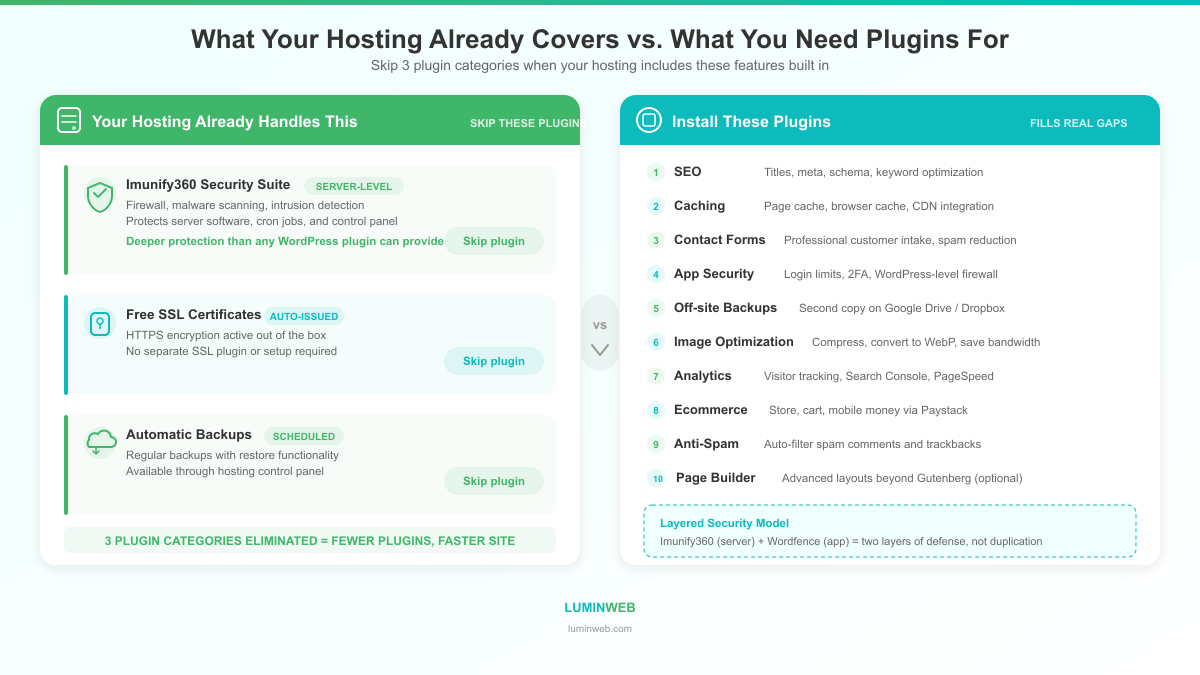
That’s three entire plugin categories you can skip. Your hosting is doing the heavy lifting, so your plugin list stays lean and your site stays fast.
Now let’s cover the 10 categories where WordPress plugins genuinely fill a gap.
1. SEO Plugin: Rank Math
Why this category matters: Search engines are how most people find business websites. Without an SEO plugin, WordPress has no built-in tools to optimize your titles, meta descriptions, or content structure for Google.
Our pick: Rank Math (Free)
Rank Math has millions of active installations and consistently high ratings. The free version gives you features that competing plugins lock behind paid tiers: unlimited keyword optimization, a built-in redirect manager, 404 monitoring, Google Analytics 4 integration, and 18 schema types.
It’s also lighter on server resources than alternatives, which matters for page speed.
Runner-up: Yoast SEO (Free tier available) — the long-time standard, but Rank Math’s free tier is more generous.
2. Performance and Caching Plugin
Why this category matters: A caching plugin stores pre-built versions of your pages so your server doesn’t rebuild them for every visitor. This makes your site load faster, reduces server strain, and delivers a better experience — especially for visitors on slower connections.
To go deeper on WordPress speed optimization, read our guide on how to speed up your WordPress site.
Our pick: W3 Total Cache (Free)
W3 Total Cache is one of the most established caching plugins for WordPress. It handles page caching, browser caching, database caching, and CDN integration. The free version covers everything most business sites need.
Runner-up: WP Super Cache (Free) — a simpler option if you want caching without the configuration complexity.
3. Contact Form Plugin
Why this category matters: Every business website needs a way for customers to reach you. A contact form is more professional than pasting your email address on a page, it reduces spam, and it lets you collect the specific information you need.
Our pick: WPForms Lite (Free)
WPForms is one of the most popular WordPress contact form plugins with millions of active installations. The drag-and-drop builder makes creating forms straightforward, even if you’ve never touched code. The free version handles contact forms, feedback forms, and simple surveys.
Runner-up: Contact Form 7 (Free) — lightweight and flexible if you’re comfortable with minimal configuration. It’s less visual but uses fewer resources.
4. WordPress Security Plugin (Application-Level Hardening)
Why this category matters: Your hosting’s Imunify360 protects your server. But adding a WordPress security plugin creates a second layer of defense inside WordPress itself. Think of it like having a security guard at the building entrance (Imunify360) and locks on your office door (security plugin). For a broader look at hosting-level protection, read our web hosting security guide.
Our pick: Wordfence (Free)
Wordfence adds a WordPress-level firewall, login attempt limits, two-factor authentication, and malware scanning within your WordPress files. The free tier covers the essentials.
Since your hosting already handles server-level security, you don’t need the premium version. The free tier adds meaningful protection without duplicating what Imunify360 already does.
Runner-up: Sucuri Security (Free tier) — offers similar features with a focus on file integrity monitoring.
5. Backup Plugin for Off-Site Copies
Why this category matters: Your hosting includes automatic backups. That’s your first safety net. A backup plugin adds a second copy stored somewhere else — like Google Drive or Dropbox. If something goes wrong with your hosting backup, you still have a copy.
Our pick: UpdraftPlus (Free)
UpdraftPlus lets you schedule automatic backups to cloud storage providers including Google Drive, Dropbox, and Amazon S3. The free version handles full site backups and one-click restores.
Set it to back up weekly to a cloud service you already use. You’ll have peace of mind knowing your site data exists in two separate places.
Runner-up: BackWPup (Free) — another solid option with cloud storage support.
6. Image Optimization Plugin
Why this category matters: Images are usually the largest files on any web page. Unoptimized images slow your site down dramatically. This matters everywhere, but it’s especially critical for your visitors browsing on mobile data in Ghana and across Africa, where every kilobyte counts.
Our pick: ShortPixel (Freemium — 100 free credits/month)
ShortPixel compresses your images without visible quality loss. It processes images in the cloud so it doesn’t tax your server, converts to next-gen formats like WebP, and can optimize existing images in bulk.
Runner-up: Smush (Free tier) — a popular alternative with unlimited free compression for images up to 5MB. Imagify (Freemium) is another strong option.
7. Analytics Plugin
Why this category matters: You can’t improve what you don’t measure. An analytics plugin connects your WordPress site to Google Analytics so you can see where your visitors come from, which pages they visit, and where they drop off.
Our pick: Site Kit by Google (Free)
Site Kit is Google’s official WordPress plugin. It connects Google Analytics, Search Console, AdSense, and PageSpeed Insights into one WordPress dashboard. Setup takes minutes, and the data is pulled directly from Google’s own tools.
Since it’s built by Google, you get accurate data without third-party intermediaries.
Runner-up: MonsterInsights Lite (Free) — adds more visual dashboards within WordPress if you prefer not to visit Google Analytics directly.
8. Ecommerce Plugin: WooCommerce + Paystack
Why this category matters: If you’re selling products or services online, you need ecommerce functionality that accepts the payment methods your customers actually use.
For a deeper dive into setting up an online store in Ghana, check out our ecommerce hosting guide for Ghana.
Our picks:
WooCommerce (Free) — the standard WordPress ecommerce plugin. It turns your WordPress site into a full online store with product pages, shopping cart, inventory management, and shipping options.
Paystack for WooCommerce (Free) — this is the payment gateway plugin that makes WooCommerce work for Ghanaian businesses. Paystack supports payments via Mastercard, Visa, Mobile Money (MTN MoMo, Telecel Cash), Bank Transfer, and USSD for merchants in Ghana, Nigeria, Kenya, and South Africa.
Most global plugin guides recommend Stripe or PayPal as primary payment options. Those have limited availability in Ghana. Paystack is built for this market and accepts the payment methods your customers already use.
9. Anti-Spam Plugin
Why this category matters: Once your site has a contact form or a comments section, spam follows. Spam comments hurt your site’s credibility, waste your time, and can even contain malicious links. An anti-spam plugin filters this automatically.
Our pick: Antispam Bee (Free)
Antispam Bee blocks spam comments and trackbacks without sending user data to external servers. It’s GDPR-friendly, lightweight, and effective. No API key needed — it works right out of the box.
Runner-up: Akismet Anti-Spam (Free for personal use, paid for commercial) — the most well-known option, but requires an API key and the free tier is limited to personal sites.
10. Page Builder Plugin (Optional)
Why this category matters: WordPress’s built-in block editor (Gutenberg) handles most content needs. But if you want more design flexibility — custom layouts, advanced sections, animations — a page builder plugin gives you drag-and-drop visual design without writing code.
This category is optional. Many business sites run perfectly well with the default editor.
Our pick: Kadence Blocks (Free)
Kadence Blocks extends the native WordPress block editor with advanced layout options, row/column controls, and design elements. Because it builds on Gutenberg rather than replacing it, pages load faster than with full page builders. It’s lightweight and won’t slow your site down.
Runner-up: Elementor (Free tier) — the most popular visual page builder. More powerful design tools, but heavier on resources. Use it if you need complex visual layouts and are willing to accept the performance trade-off.
How to Evaluate Any WordPress Plugin Before Installing
Beyond these 10 essential WordPress plugins, you’ll occasionally need a plugin for something specific. Here’s a quick checklist to evaluate any WordPress plugin before you install it:
- Last updated — Was it updated in the last 6 months? Outdated plugins are security risks.
- Active installations — Look for 10,000+ active installations minimum. For core categories, aim for 100,000+.
- WordPress compatibility — Does it list compatibility with your current WordPress version?
- Star rating — 4 stars or higher on WordPress.org is a good baseline.
- Support forum activity — Is the developer responding to support requests? Abandoned plugins leave you stuck when something breaks.
If a plugin fails two or more of these checks, look for an alternative.
WordPress Plugin Management Tips
Installing the right plugins is half the job. Keeping them healthy is the other half.
- Update regularly — Plugin updates fix security vulnerabilities and compatibility issues. Check for updates weekly.
- Delete what you don’t use — Deactivating a plugin isn’t enough. Deactivated plugins still sit on your server and can be exploited. Delete them.
- Test updates on a staging site — If your business depends on your website, test major plugin updates on a copy of your site first. One incompatible update can take your site offline.
- Keep your total count low — Aim for 10 to 15 active plugins. Every WordPress plugin adds load time. If you can handle a task through your hosting panel or theme settings instead of a plugin, do that.
Your Essential WordPress Plugin Stack: Quick Reference
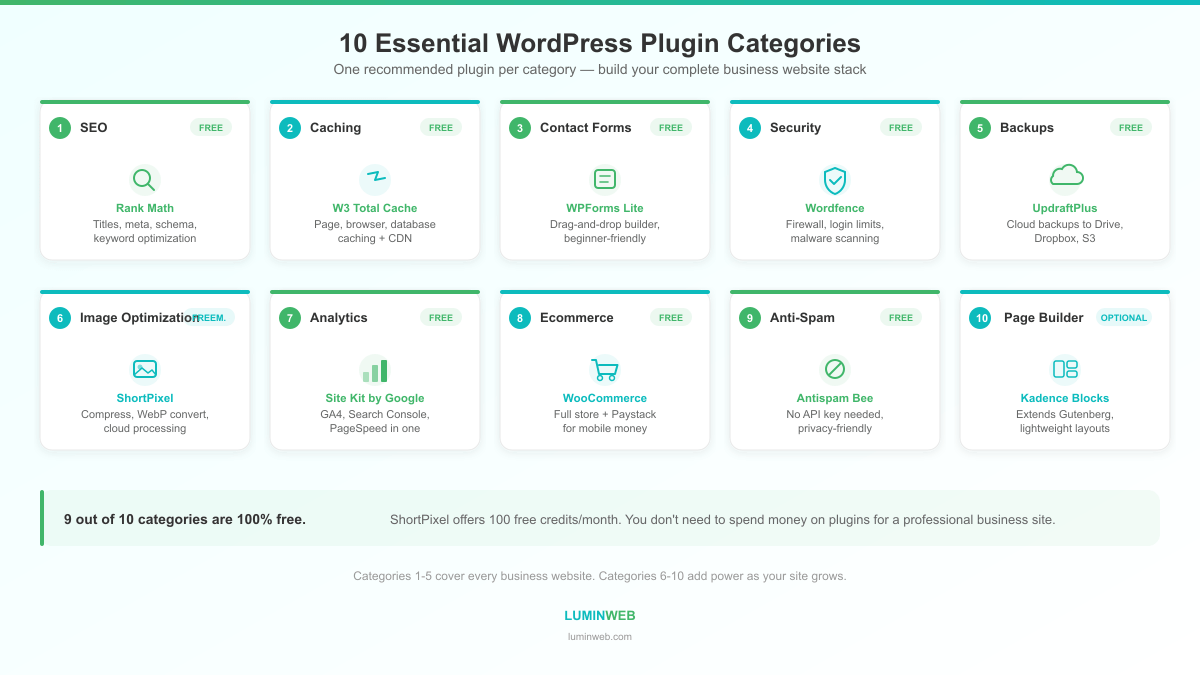
| Category | Recommended Plugin | Cost | Why |
|---|---|---|---|
| SEO | Rank Math | Free | Generous free tier, lightweight |
| Caching | W3 Total Cache | Free | Established, full-featured |
| Contact Forms | WPForms Lite | Free | Drag-and-drop, beginner-friendly |
| Security Hardening | Wordfence | Free | Adds app-level protection alongside server security |
| Off-Site Backups | UpdraftPlus | Free | Cloud storage backups to Google Drive/Dropbox |
| Image Optimization | ShortPixel | Freemium | Cloud-based compression, WebP support |
| Analytics | Site Kit by Google | Free | Official Google plugin, multiple tools in one |
| Ecommerce | WooCommerce + Paystack | Free | Full store + mobile money payments for Ghana |
| Anti-Spam | Antispam Bee | Free | No API key needed, privacy-friendly |
| Page Building | Kadence Blocks | Free | Lightweight, extends native editor |
Notice the pattern: nine out of ten are completely free. The tenth (ShortPixel) has a generous free tier. You don’t need to spend money on WordPress plugins to run a professional business website.
And if your hosting already includes Imunify360 security, free SSL, and automatic backups — like LUMINWEB Shared Hosting and WordPress Hosting plans do — you’ve already eliminated the three most common plugin categories that other guides tell you to pay for.
That’s fewer plugins, faster load times, and more time spent growing your business instead of managing your website.
To understand how WordPress hosting works under the hood and why it matters for plugin performance, read our complete guide.
Frequently Asked Questions
What plugins do I need for a WordPress business website?
At minimum, your business site needs essential WordPress plugins for SEO, caching, contact forms, analytics, and anti-spam. If you sell products online, add WooCommerce and a payment gateway like Paystack. Check what your hosting already covers — you may not need separate security, SSL, or backup plugins.
How many WordPress plugins should a website have?
Aim for 10 to 15 active plugins. Quality matters more than quantity. Each active plugin adds PHP execution overhead and potential database queries that can slow your site. Remove any plugin you’re not actively using.
Do WordPress plugins slow down your website?
Yes, they can. Every active WordPress plugin adds code that runs on each page load. Poorly coded plugins or too many plugins compound the effect. The solution isn’t to avoid plugins entirely — it’s to choose lightweight, well-maintained ones and keep your total count low.
What is the best security plugin for WordPress?
Wordfence is the most popular free option for application-level security. But if your hosting includes server-level protection like Imunify360, you already have the stronger layer of security in place. A WordPress security plugin adds useful extras (login protection, two-factor authentication) but isn’t a substitute for server-level security.
Do I need a backup plugin if my hosting includes backups?
Your hosting backups are your primary safety net. A backup plugin like UpdraftPlus adds a secondary copy stored off-site (Google Drive, Dropbox). It’s not strictly necessary, but the extra layer of protection is worth the minimal setup time for any business website.
