



What Is Web Hosting? A Beginner’s Guide (2026)
Web hosting is a service that stores your website’s files on a server and delivers them to visitors over the internet. It works by keeping your site on a connected computer that responds when someone types your domain. You need it for any website — business, blog, or store — to be reachable online.
What Is Web Hosting, in Plain English?
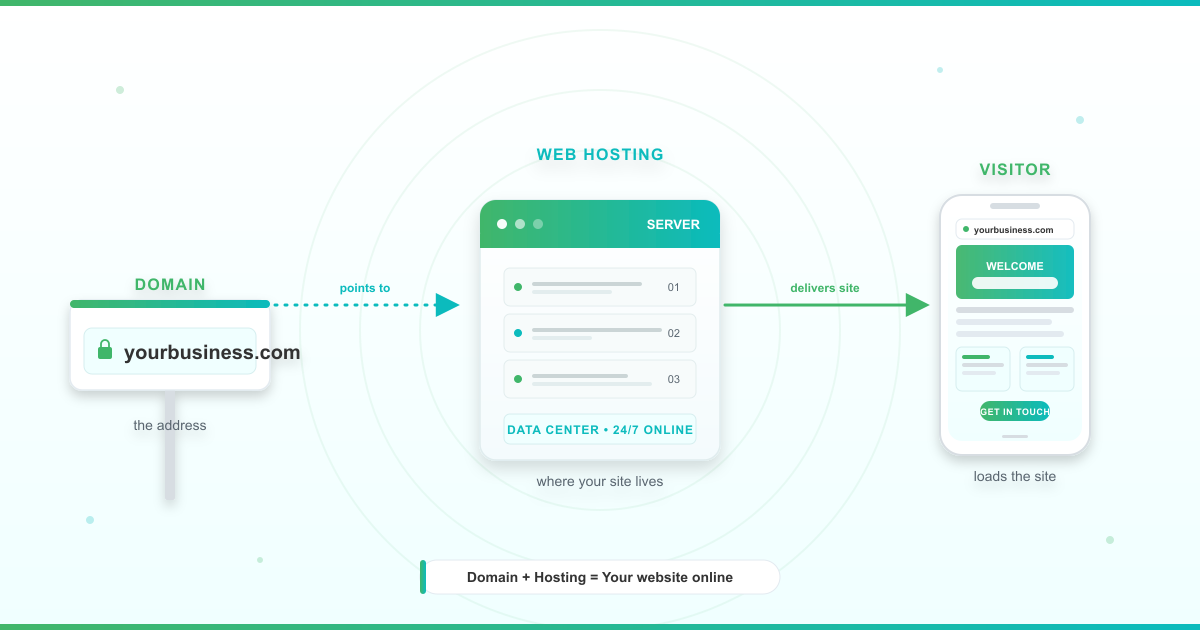
Think of the internet as a city and your website as a shop. Your domain name (like yourbusiness.com) is the street address. Your web hosting is the land and building where the shop actually sits.
Without hosting, your domain points to nothing. With hosting, your website lives on a powerful computer — a server — that stays online 24/7 inside a secure facility called a data center. Whenever someone types your address into a browser, that server delivers your pages back in seconds.
If you’re a business owner in Accra, Lagos, or Nairobi launching your first website, this is the foundation every site sits on. The goal here is to strip the jargon away so you can make a confident hosting decision — including choosing reliable hosting in Ghana when you’re ready.
How Does Web Hosting Work? (Step-by-Step Walkthrough)
The behind-the-scenes path from a visitor’s click to your page loading feels instant, but several things happen in sequence. Here’s the full flow, labeled so you can see exactly where hosting fits in.
- You register a domain name. This is your website’s address — the thing visitors type, like yourbusiness.com. A domain on its own does nothing; it only works once it’s pointed at a host.
- You publish your website files to a hosting server. This is the “hosting” part. Your pages, images, code, and database all live on a server connected to the internet 24/7. With Luminweb, you publish via cPanel or DirectAdmin, or a one-click installer like Softaculous.
- A visitor types your URL into a browser. Their browser starts looking for the computer that holds your site. At this moment, the browser doesn’t yet know where your site physically lives.
- The browser asks DNS to find your site. DNS (Domain Name System) is the internet’s phonebook. It translates a human-friendly name like yourbusiness.com into a numerical IP address that computers can route to.
- DNS returns your server’s IP address. The browser now knows the exact location of your hosting server — a specific address on the internet, like 198.51.100.42.
- The hosting server delivers your files. This is the “hosting” part again. Your server receives the request, pulls the right files, and sends them back over the internet to the visitor’s browser.
- The browser renders your page. The browser assembles the HTML, CSS, images, and scripts into the finished page the visitor sees on screen.
All of that typically happens in under two seconds. The quality of steps 2 and 6 — the hosting steps — decides whether your page feels fast or frustrating. A well-configured server on reliable infrastructure delivers pages quickly and signals quality to search engines like Google.
What Are the Types of Web Hosting?
Not every website needs the same muscle. The type of hosting you choose controls how much server power, storage, and control you get — and how much you pay for it. Here are the five main types of web site hosting you’ll see in 2026.
Shared Hosting
With Shared Hosting, your website lives on a single server alongside other websites. Think of it like renting an apartment in a building — you have your own space, but you share the building’s utilities with other tenants.
This is the most budget-friendly option and the right fit for blogs, portfolio sites, small business websites, and first-time projects. You get everything you need to launch without paying for resources you won’t use yet. If you want a deeper side-by-side, read our breakdown of shared vs dedicated hosting compared. Luminweb Shared Hosting plans include a free domain, free SSL, and the Softaculous one-click installer for WordPress and 400+ other apps.
WordPress Hosting
WordPress Hosting is a server environment tuned specifically for WordPress sites. The caching, security, and configuration are all pre-optimized so WordPress runs fast out of the box.
It’s built for WordPress blogs, business sites on WordPress, and WooCommerce stores. You get one-click WordPress installation, WordPress-specific support, and automatic backups — so you can focus on content instead of server admin. Luminweb WordPress Hosting ships with Imunify360 security, automatic backups, and servers tuned for fast WordPress load times.
VPS Hosting
VPS Hosting (Virtual Private Server) slices a physical server into virtual sections, each with its own guaranteed resources. Think of it like owning a townhouse — you share the overall structure, but your section is yours alone with dedicated CPU, RAM, and storage.
VPS is the right move for growing businesses, developers running custom applications, and higher-traffic sites that have outgrown Shared Hosting. You get full root access to configure the server how you need. Not sure if you’re ready? Read when to upgrade to VPS hosting. Luminweb VPS Hosting runs on NVMe storage with full root access and your choice of control panel.
Cloud Hosting
With Cloud Hosting, your site runs across a network of interconnected servers instead of a single machine. If one server hits an issue, another takes over. Resources scale up or down automatically based on traffic.
Cloud suits businesses with unpredictable traffic patterns, fast-growing startups, and applications where high availability is a priority. Pricing is usually usage-based, which means costs move with your traffic — a strength when traffic is modest and a consideration when it spikes.
Dedicated Hosting
With Dedicated Hosting, you rent an entire physical server exclusively for your website. This is the standalone house — no shared walls, no shared neighbours. You get maximum performance, storage, and control.
Dedicated hosting is built for enterprise applications, very high-traffic sites, and workloads where performance and isolation can’t be compromised. It’s a premium tier with premium responsibility — you or your team manage the full stack. Luminweb does not currently offer dedicated hosting; for most growing African businesses, VPS Hosting delivers the dedicated resources you need without the full-server overhead.
Hosting Types at a Glance
| Hosting Type | Best For | Cost Tier | Speed | Scaling | Maintenance |
|---|---|---|---|---|---|
| Shared Hosting | Blogs, small business sites, first websites | Entry-level | Standard | Limited — upgrade as traffic grows | Managed by host |
| WordPress Hosting | WordPress blogs, small business WP sites, WooCommerce | Entry-level | Optimized for WordPress | Limited — upgrade to VPS when scaling | Managed + WP-specific support |
| VPS Hosting | Growing businesses, developers, higher-traffic sites | Mid-tier | High (NVMe on Luminweb) | Flexible — scale CPU, RAM, storage as needed | Self-managed with root access |
| Cloud Hosting | Variable traffic, high-availability needs | Variable (usage-based) | High, elastic | On-demand, near-unlimited | Varies by provider |
| Dedicated Hosting | Enterprise apps, very high traffic | Premium | Maximum | Vertical only — full-server upgrades | Self-managed |
What to Look for in a Web Hosting Provider
Knowing the hosting types is half the decision. The other half is knowing what to evaluate in the provider itself. Work through this checklist before you buy.
- Uptime target. Look for at least 99.9% uptime. Every minute of downtime is a minute your visitors, customers, and revenue can’t reach you. Luminweb targets 99.9% uptime.
- Storage type. SSD should be the minimum in 2026. NVMe is the higher-performance step up — Luminweb VPS Hosting uses NVMe; Shared and WordPress Hosting use SSD.
- Bandwidth. This is how much data your server can deliver to visitors. If you expect traffic spikes or serve large images and videos, make sure your plan gives you headroom.
- Security. SSL certificates, a firewall, and malware scanning aren’t optional extras — they’re baseline. Imunify360 (Luminweb’s stack) combines all three into one layer you don’t have to configure yourself.
- Automatic backups. Backups are your safety net for bad updates, accidental deletions, or security incidents. Look for automatic, regular backups with a simple restore workflow.
- Control panel. cPanel or DirectAdmin give you a visual interface to manage hosting, email, applications, and settings without touching the command line. Luminweb offers both.
- Customer support. When something breaks at 2am, you need a team that answers. Check what channels are offered (chat, email, ticket), response times, and whether support hours match your time zone.
- Scalability path. Your site today is not the site you’ll run in two years. Pick a provider that lets you move from Shared to VPS without migrating to a new company. Start small, scale when ready.
- Transparent pricing. Watch for renewal price jumps and paid “extras” like SSL, backups, and domain registration that should be included. No surprises, no hidden fees is a promise worth demanding — and the reason many first-time buyers learn the real cost of free hosting the hard way.
Should Your Business Host Locally or Internationally? (Ghana Perspective)
Most global hosting guides skip this question. If you’re running a business in Ghana, Nigeria, or Kenya, it matters more than almost any other decision.
When local hosting wins. If most of your visitors are in Ghana or West Africa, a local provider shortens the path between visitor and server. Local-currency billing removes exchange-rate risk — you’re not one GHS-to-USD swing away from a renewal shock. Local support means you can reach a real person during Ghanaian business hours, not at 3am in a foreign time zone.
When international hosting makes sense. If your audience is genuinely global, or you need a specific data-center region, or your team already has workflows locked into a specific international provider, international hosting can be the right call. It’s narrower than most beginners assume.
Mobile-data reality. Most readers across Africa access the web on mobile data, not fibre broadband. Raw server location matters less than whether your hosting supports a content delivery network (CDN), image optimization, and caching. A well-optimized site on modern infrastructure usually beats a “closer” server that isn’t tuned for mobile.
Power and connectivity. Intermittent power is a reality of doing business in parts of Sub-Saharan Africa. That’s exactly why uptime targets matter more here, not less — your office may lose power, your hosting shouldn’t. Resilient infrastructure (Luminweb runs on enterprise-grade cloud infrastructure with a 99.9% uptime target) keeps your site online even when local conditions aren’t.
For a full side-by-side, see our local vs international hosting comparison, and if you’re ready to weigh specific providers, our guide to choosing reliable hosting in Ghana walks you through the full decision.
Web Hosting vs Domain Name: What’s the Difference?
This is the most common point of confusion for beginners, and it’s worth clearing up in one paragraph.
Your domain name is your website’s address — what people type to find you (like yourbusiness.com). Web hosting is the server space where your website’s files actually live. You need both. The domain tells browsers where to look; the hosting server is what they find when they arrive. Without a domain, visitors can’t find your site. Without hosting, there’s nothing to find.
Most reputable hosts bundle the two to make getting started simpler. Luminweb Shared Hosting and WordPress Hosting both include a free domain and free renewal — one less thing on your launch checklist.
How to Host a Website: Getting Started in 6 Steps
Ready to launch? Here’s the six-step path from zero to live — everything you need to host a website of your own in 2026.
- Pick your hosting type. Most first websites start on Shared Hosting or WordPress Hosting — both are designed for people who don’t want to manage a server.
- Choose a plan. Match the plan’s storage and bandwidth to your realistic needs. If in doubt, start smaller — you can upgrade later without penalty.
- Register your domain. Pick something memorable and brandable. Many hosting plans (including Luminweb’s) include a free domain, so check before paying separately.
- Set up your site. Use a one-click installer like Softaculous to deploy WordPress, Joomla, Drupal, or any of 400+ applications in minutes. No coding, no file uploads.
- Configure SSL and email. Turn on your free SSL certificate (the padlock in the browser bar), then set up your professional email addresses at your domain.
- Launch and test. Open your site on a desktop and a phone. Check every page, test contact forms, and confirm the padlock appears in both browsers.
Already have a site on another host? Our guide to migrating an existing website walks you through the safe handover.
Ready to launch? Luminweb Shared Hosting plans bundle everything you need in one plan — free domain, free SSL, one-click installer, and Imunify360 security.
Frequently Asked Questions
Do I need web hosting for my website?
Yes. Every website needs hosting to be reachable on the internet. Even site builders like Wix or Squarespace include hosting in their package — you just don’t manage it directly. If you want more control, the freedom to use any platform, and the ability to move providers later, standalone hosting is the better long-term foundation.
What is the difference between a domain name and web hosting?
A domain name is your website’s address (yourbusiness.com). Web hosting is the server space where your site’s files actually live. You need both. The domain tells browsers where to look; the hosting server is what the browser loads when it arrives. Most hosting providers, Luminweb included, let you register or bundle both in a single signup.
Can I host a website for free?
Technically yes — but free hosting almost always comes with ads on your site, shared branding, slow performance, strict limits, and no real support. For a personal experiment it can work. For anything you want customers or search engines to take seriously, paid hosting is the right call. Our breakdown of the real cost of free hosting shows the full tradeoff.
What type of web hosting should a beginner choose?
Start with Shared Hosting if your site is simple (brochure, portfolio, small store) or WordPress Hosting if you know you’ll run WordPress. Both hide the server complexity behind a control panel, include security and backups, and give you a clear upgrade path to VPS once your traffic grows. Start small, scale when ready.
Where should a Ghana business host its website?
If most of your customers are in Ghana or West Africa, a local provider with GHS billing, local support, and infrastructure tuned for African audiences (mobile-first, CDN, strong uptime) is usually the right choice. Luminweb is built for African businesses, runs on enterprise-grade cloud infrastructure, and is backed by a money-back guarantee on shared hosting. International hosting only makes sense when your audience is genuinely global.
Can I switch hosting providers later?
Yes. You can migrate your website from one provider to another by moving your files, databases, and DNS settings. Many providers offer migration assistance to keep downtime to a minimum. Picking a host that uses standard tools (cPanel, DirectAdmin) makes future moves straightforward. Our website migration guide walks through the full process.
Launch With a Hosting Partner Built for African Businesses
Web hosting is the foundation every website sits on. Get it right at the start and everything above it — speed, security, search visibility, customer trust — becomes easier.
Luminweb Shared Hosting is built for African businesses that want a clear, honest starting point: free domain included, free SSL, Softaculous one-click installer, Imunify360 security, enterprise-grade cloud infrastructure, backed by a money-back guarantee on shared hosting. Some items are non-refundable, so read the refund policy before you pay.
When you’re ready to go deeper, our pillar guide on choosing reliable hosting in Ghana walks you through every angle — from performance to support to long-term scalability.
